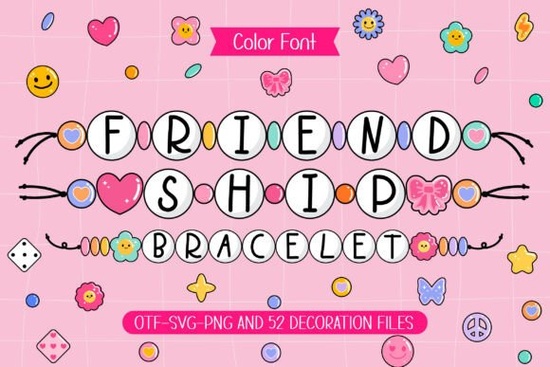
If you’ve ever made or received a friendship bracelet, you know there’s something special about those little beaded strands they’re more than just accessories. They’re tokens of connection, handmade with care. That same spirit is captured in the Friendship Bracelet Font, a cheerful typeface that turns letters into strings of colorful beads. Whether you’re designing t-shirts for a summer camp, crafting birthday cards, or personalizing tote bags for a small business, this font brings warmth and personality to your projects.
It’s not just a font it’s a vibe. Each character looks like it’s been threaded together with bright plastic beads, giving your text an instantly nostalgic, handmade feel. And because it includes matching doodle cliparts, you can mix and match icons like hearts, stars, and smiley faces to create full scenes or accent designs without needing extra assets.
What kinds of projects work best with this font?
This isn’t the kind of font you’d use for a corporate report or formal invitation. But if your goal is to spark joy, celebrate friendship, or add a playful touch to casual crafts, it’s perfect. Here are some real-world uses:
- Craft T-shirts and hoodies – Pair phrases like “Best Friends Forever” or “Squad Goals” with bead-style lettering for wearable nostalgia.
- Scrapbooking layouts – Use the font for journaling titles or captions next to photos of sleepovers, road trips, or birthday parties.
- DIY gift tags and cards – Whether it’s for Valentine’s Day, Galentine’s, or just because, the handwritten-bead look feels personal and sweet.
- Print-on-demand products – Think mugs, stickers, phone cases, and tote bags anything that benefits from a fun, youthful aesthetic.
- Kids’ party decor – Print banners, cupcake toppers, or favor labels using this font to keep the energy light and colorful.
Is it easy to install and use?
Yes. You’ll get one OTF file, which works across most design software think Canva, Adobe Illustrator, Photoshop, Silhouette Studio, and Cricut Design Space. If you’ve installed fonts before, this will feel familiar. Even if you haven’t, Creative Fabrica provides clear instructions, and most platforms let you drag-and-drop or import fonts in just a few clicks.
The included doodles? Those come as separate PNG or SVG files (depending on your download), so you can resize, recolor, or layer them however you like. Want to turn a lowercase “o” into a smiling sun? Go ahead. The flexibility here encourages experimentation.
How does it compare to other playful fonts?
There are plenty of cute, hand-drawn fonts out there, but what sets Friendship Bracelet Font apart is its specific visual metaphor. It doesn’t just look “fun” it looks like something tangible you might have made as a kid. That emotional resonance matters, especially when you’re creating for audiences who value authenticity over polish.
Fonts like “Bubblegum Pop” or “Crayon Crumble” lean into candy colors or childlike scribbles. This one leans into shared memories campfires, passed notes, trading bracelets at recess. That specificity makes it stand out in a crowded market of generic “cute” fonts.
Can I use it commercially?
Absolutely. Like most Creative Fabrica products, this font comes with a commercial license. That means you can sell physical items (like printed shirts or greeting cards) or digital templates (like Canva kits or Etsy printables) without paying extra fees or crediting the designer. Just don’t resell the font file itself that’s always off-limits.
If you run a small shop or side hustle, that license is a big deal. You’re free to experiment, scale, and monetize without legal guesswork.
Any tips for getting the most out of it?
Here’s what works well in practice:
- Pair it with simple sans-serifs. Let the bead font shine as a headline or accent, then use something clean like Montserrat or Open Sans for body text.
- Play with color combinations. Try pastel backgrounds with neon bead letters or vice versa. The font was designed to pop.
- Add texture. A subtle paper grain or fabric overlay in your design software can make the bead effect feel even more tactile.
- Use the doodles as dividers or borders. Scatter hearts or stars between words, or frame your text with a string of clipart beads for extra charm.
You can find similar styles in the colorful fonts collection, where designers share playful, emotionally expressive typefaces perfect for crafters and small brands.
Quick checklist before you start:
- ✅ Download and install the OTF file + clipart pack
- ✅ Test the font in your preferred software (size it up details matter!)
- ✅ Sketch a few layout ideas: cards, shirts, social media graphics
- ✅ Pick 2–3 color palettes that match your project’s mood
- ✅ Save your favorite doodles as go-to accents
Whether you’re making gifts for friends or products for customers, this font helps you say “I made this with you in mind.” Sometimes, that’s exactly the message your design needs.
 Font Preppycrush: Design & Download Guide
 Creative Black Fonts for Modern Web Design
 Creative Hoodie Fonts for Your Brand Identity
 Sunday Bright: the Modern Script Font for Creative Projects
 Designing with Handwriting Fonts: Style, Readability, & Inspiration
 Fonts for Crafting a Beautiful Digital Smile